• Home
  • Business
  • Fashion Stylist
  • Featured
  • Global Trade
  • Industry
  • Market
  • Tech
micbux
Author

Gary

Gary

Global Trade

Troubleshooting Smart Designer Ceiling Fans with Lights: Fast Fixes for Connectivity Drops and Laggy Remotes

by Gary May 25, 2026
written by Gary

Start here — why this guide matters

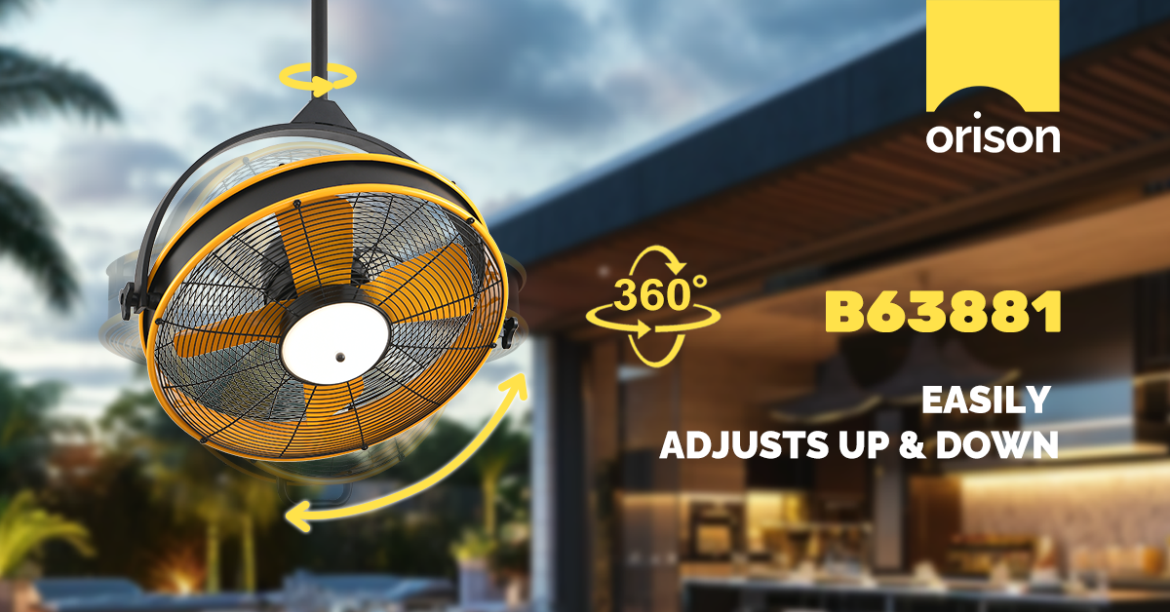
If your stylish smart ceiling fan with integrated lighting keeps dropping off the network or the remote responds like it’s thinking about it — you’re not alone. This problem-driven guide cuts straight to practical fixes so you can stop fussing and enjoy consistent comfort. Whether you own a high-end designer unit or a compact model, many issues share common roots: Wi-Fi pairing quirks, receiver faults, or simple power and wiring annoyances. If you’re researching new installs, also consider how a model of ceiling fans with light integrates with your home automation before you buy — it saves headaches later.

ceiling fans with light

Recognize the common symptoms

Before you start toggling switches, identify the pattern. Typical signs include: intermittent on/off via app, long delays between remote press and action, lights dimming unexpectedly, or the fan dropping entirely from your smart home platform. Note if the problem is seasonal (temperature affects capacitors) or tied to router changes — that clue points you toward either hardware or network troubleshooting.

Quick fixes that resolve most issues

Try these high-impact steps in order; they resolve around 80% of everyday faults.

  • Power-cycle the fan: switch off at the wall or breaker for 30 seconds, then restore power. This clears receiver and firmware hiccups.
  • Reboot your router and confirm the fan is on the router’s 2.4 GHz band (many fans don’t support 5 GHz). Avoid dual-band confusion by temporarily disabling 5 GHz during pairing.
  • Replace or recharge remote batteries and re-pair the IR/ RF remote according to the manual — cheap batteries often cause latency.
  • Check for firmware updates via the fan’s app or vendor portal; a firmware update can resolve persistent latency or pairing failures.
  • Inspect the canopy: loose neutral or ground wires can create intermittent behavior — tighten connectors after cutting power.

Network vs. hardware: how to tell the difference

If the app and cloud control fail while the wall switch and physical pull-chain work, suspect a network or Wi‑Fi hub issue. Look for these telltale signs: multiple devices on the same Wi‑Fi struggling, the fan appears in the router but shows “limited” connectivity, or the fan disconnects when the router updates. Conversely, if the remote and local controls lag or stutter but the fan stays online, the receiver, motor capacitor, or internal dimming driver is more likely at fault — and that’s a hardware pathway.

Steps when network issues are the culprit

Network problems are surprisingly common and often fixable without a tech. First, ensure the fan’s IP address is stable — assign a DHCP reservation. If you have a Wi‑Fi mesh or a hub, place the hub within line-of-sight of the fan’s location, and minimize RF interference from nearby microwaves or cordless phones. Use a simple spectrum check app or temporarily move the router to test if signal strength is the issue. If your system uses a Wi‑Fi-to-hub bridge, update the bridge firmware and confirm the hub’s LED status codes per the manual.

When hardware repair is needed — and what to expect

Hardware issues require a different approach. Stuttering or humming at low speeds can point to a failing motor capacitor or an incompatible PWM dimming driver. Look for burnt smells, visible discoloration, or oil leakage near the motor — those are hard failure signs. In many designer units the smart receiver is modular; replacing the receiver or capacitor often restores responsiveness without swapping the entire fan. If you’re not comfortable with wiring or cap testing, call a qualified electrician — safety first.

Preventing future remote response lags

Adopt these practices to keep your fan snappy:

  • Use good-quality alkaline or rechargeable batteries in remotes and replace yearly.
  • Keep firmware current on both the fan and any Wi‑Fi hub; vendors push fixes for latency issues.
  • Install the fan canopy cleanly to avoid intermittent ground/neutral contact and reduce EMI.

Also avoid cheap aftermarket remotes — compatibility mismatches with neck finish or receiver protocols can introduce lag — and remember that Bluetooth mesh systems behave differently than Wi‑Fi; treat them as separate ecosystems.

Common mistakes that turn a small glitch into a project

People often skip the basics and jump to big fixes: swapping the entire fan, re-running home wiring, or changing out the router without testing. Don’t assume every lag is an internet problem — test the IR or RF remote directly at close range to isolate issues. And don’t ignore vendor docs: many modern units require pairing on the 2.4 GHz band and a specific sequence for first-time setup.

ceiling fans with light

Advisory — three golden evaluation metrics before you act

When choosing a fix or deciding whether to replace components, evaluate these metrics:

  1. Latency under load: measure typical response time (in seconds) from app/remote to action. Aim for sub‑second to 2-second behavior; anything longer signals intervention.
  2. Network stability score: check historical uptime for the fan in your router logs. Frequent DHCP renewals or IP changes indicate network-level causes.
  3. Hardware integrity: inspect motor sound, canopy wiring, and receiver temperature after 10–15 minutes of operation. Unusual heat or noise points to replacement parts rather than network tweaks.

For homeowners who want a resilient smart installation, choosing a model that combines clear firmware support with good receiver accessibility pays off — and vendors like Orison design systems with that usability in mind. —

May 25, 2026 0 comments
0 FacebookTwitterPinterestEmail

Recent Posts

  • When Supply Meets Science: A Problem-Driven Look at COC Vial Failures
  • From Pop-up Canopy to Pavilion: The Evolution of Outdoor Gazebo Design
  • 7 Practical Approaches to Safer Skin Pricks with Disposable Safety Lancets
  • Material Design Meets Co‑Extrusion: A User‑Centred Guide to High‑Performance Custom Clear Poly Mailers
  • Troubleshooting Smart Designer Ceiling Fans with Lights: Fast Fixes for Connectivity Drops and Laggy Remotes

Recent Comments

No comments to show.

Keep in touch

Facebook Twitter Instagram Pinterest Youtube Bloglovin

Recent Posts

  • When Supply Meets Science: A Problem-Driven Look at COC Vial Failures

    May 29, 2026
  • From Pop-up Canopy to Pavilion: The Evolution of Outdoor Gazebo Design

    May 29, 2026
  • 7 Practical Approaches to Safer Skin Pricks with Disposable Safety Lancets

    May 27, 2026
  • Material Design Meets Co‑Extrusion: A User‑Centred Guide to High‑Performance Custom Clear Poly Mailers

    May 26, 2026
  • Troubleshooting Smart Designer Ceiling Fans with Lights: Fast Fixes for Connectivity Drops and Laggy Remotes

    May 25, 2026
  • Is it Safe to Rely on Conventional Infant Ventilators for Fragile Preemies?

    May 25, 2026

Categories

  • Business (95)
  • Fashion Stylist (20)
    • Clients (6)
    • Inspirations (7)
    • Magazines (7)
  • Featured (6)
  • Global Trade (114)
  • Industry (87)
  • Market (105)
  • Tech (105)
  • Facebook
  • Twitter
  • Instagram
  • Pinterest
  • Youtube
  • Bloglovin
  • Snapchat

@2021 - All Right Reserved. Designed and Developed by PenciDesign


Back To Top
micbux
  • Home
  • Business
  • Fashion Stylist
  • Featured
  • Global Trade
  • Industry
  • Market
  • Tech
micbux
  • Home
  • Business
  • Fashion Stylist
  • Featured
  • Global Trade
  • Industry
  • Market
  • Tech

Recent Posts

  • When Supply Meets Science: A Problem-Driven Look at COC Vial Failures

    May 29, 2026
  • From Pop-up Canopy to Pavilion: The Evolution of Outdoor Gazebo Design

    May 29, 2026
  • 7 Practical Approaches to Safer Skin Pricks with Disposable Safety Lancets

    May 27, 2026
  • Material Design Meets Co‑Extrusion: A User‑Centred Guide to High‑Performance Custom Clear Poly Mailers

    May 26, 2026
  • Troubleshooting Smart Designer Ceiling Fans with Lights: Fast Fixes for Connectivity Drops and Laggy Remotes

    May 25, 2026
@2021 - All Right Reserved. Designed and Developed by PenciDesign